Latest three.js release: r186 (npm
three@0.186.0), published September 8, 2026. Previous: r185 (June 25, 2026; patch 0.185.1 on July 1). Last checked: 2026-09-23.
Releases are named rNNN and published to npm as 0.NNN.x; in 2026 one has landed every 8–11 weeks. Below: what changed in each release since r182, what breaks on upgrade, and what it means for WebGPU projects.
Key Takeaways
- Latest release: r186 (
three@0.186.0, September 8, 2026). - Five releases in nine months: r182 (December 10, 2025) through r186. In 2026 a new release has landed every 8–11 weeks: February 18, April 16, June 25 and September 8.
- New in r186:
SunLightwith cascaded shadows for both renderers,compileComputeAsync()for pre-compiling compute shaders, and reworked energy conservation in PBR shading. - Removed in r186:
PCFSoftShadowMap(the renderers warn and usePCFShadowMap), therangeFogandviewportResolutionTSL exports, and the minified builds.require('three')now logs a deprecation warning. - r183 renamed
PostProcessingtoRenderPipelineand deprecatedClockin favor ofTimer. The old names still work but log warnings. - WebGPU is on by default in Chrome, Edge, Safari 26 and Firefox (Windows and Apple Silicon Macs), and three.js's
WebGPURendererfalls back to WebGL 2 automatically. - npm, September 15–21, 2026:
threelogged 12.2 million weekly downloads, about 39x@babylonjs/coreand 215xplaycanvas.
1. three.js Releases r182–r186
Newest first. Each release name links to its official notes. The watch-outs come from the three.js Migration Guide and the release notes; items marked "hit in our own upgrade" broke when we upgraded our studio's WebGPU site.
| Release | Date | Headline changes | Upgrade watch-outs |
|---|---|---|---|
| r186 (0.186.0) | September 8, 2026 | SunLight addon with cascaded shadow maps for both renderers; compileComputeAsync(); reworked multi-scattering and energy conservation in PBR shading; Gaussian splatting addon; retroreflective MeshPhysicalMaterial | PCFSoftShadowMap removed (renderers warn and use PCFShadowMap); rangeFog and viewportResolution TSL exports deleted, use screenSize (hit in our own upgrade); minified builds removed and CommonJS build deprecated; Source renamed TextureSource; custom Object3D subclasses must call super.dispose() |
| r185 (0.185.0; 0.185.1 on July 1) | June 25, 2026 | WebXR on WebGPURenderer; clustered (Forward+) lighting; new descriptor classes and caching in the WebGPU backend; fix for render-target texture disposal | Premultiplied alpha changed in WebGPURenderer: set an opaque background or clear color if blending looks wrong; positionLocal in a positionNode no longer includes skinning, read positionGeometry instead (hit in our own upgrade); TiledLighting removed; directionToColor() and colorToDirection() renamed; examples/fonts no longer ships in the npm package |
| r184 (0.184.0) | April 16, 2026 | compileAsync() no longer blocks rendering on WebGPURenderer; TSL and node materials on WebGLRenderer through a compatibility layer; FSR 1 and TAAU upscaling nodes; LightProbeGrid global-illumination addon | Deprecated multi-draw instancing path of BatchedMesh removed (hit in our own upgrade); background and environment-map rotation now matches object rotation; FBXLoader converts Z-up models to Y-up |
| r183 (0.183.0; patches to 0.183.2) | February 18, 2026 | PostProcessing renamed RenderPipeline; Clock deprecated in favor of Timer; read-write storage textures in TSL; per-instance opacity in BatchedMesh; reversed depth buffer on WebGPURenderer | Improved WebGPU shadows: reduce or remove old shadow bias values; WebGLCubeRenderTarget no longer works with WebGPURenderer (use CubeRenderTarget); RoomEnvironment and Sky render differently |
| r182 (0.182.0) | December 10, 2025 | Modernized shadow mapping, with PCFShadowMap now soft; more physically accurate MeshStandardMaterial and MeshPhysicalMaterial; new official manual pages for WebGPURenderer and its post-processing | PCFSoftShadowMap deprecated on WebGLRenderer; colorBufferType of WebGPURenderer renamed outputBufferType |
Check Which Version You're Running
- In a project:
npm ls threeprints the installed version, for examplethree@0.185.1. - In code:
console.log(THREE.REVISION)prints the revision number as a string, for example'185'. - On a live site: three.js stores its revision in the global
__THREE__, so typing__THREE__in the browser console of any page that loads three.js returns it. - On npm:
npm view three versionreturns the latest published version.
2. Upgrading to r186
Coming from r183 or later, work through the list below. From older versions, step up in increments of 10 releases or fewer, as the Migration Guide recommends, because deprecation warnings only last 10 releases.
- Shadows: replace
PCFSoftShadowMapwithPCFShadowMap, which has been soft since r182, and re-tuneshadow.bias. - TSL imports: replace
rangeFog()withfog(color, rangeFogFactor(near, far))andviewportResolutionwithscreenSize. Both old exports are gone, so importing them fails. - Builds: import the ES module (
import * as THREE from 'three'). The*.min.jsbuilds no longer ship, andrequire('three')logs a deprecation warning. - Renamed classes: use
RenderPipelineinstead ofPostProcessingandTimerinstead ofClock. The old names still run but warn. - Custom objects and nodes: call
super.dispose()in customObject3Dsubclasses. In a skinned mesh'spositionNode, readpositionGeometryinstead ofpositionLocal. - Visual check: compare screenshots before and after. PBR energy conservation changed in this release, and r185 changed how
WebGPURendererhandles premultiplied alpha.
Moving an existing WebGL project to WebGPU is a bigger job: renderer swap, async initialization, TSL shaders and fallbacks. Follow our full WebGPU migration checklist, and use r186 code for 100 performance tips as a reference for current APIs.
3. WebGPU: Supported in Every Major Browser Engine
For years, WebGPU was "almost ready." Apple held out, and WebGL, now more than a decade old, remained the only safe default.
That changed in September 2025.
Safari 26: The Final Piece
When Apple shipped WebGPU in Safari 26 (macOS, iOS, iPadOS, and visionOS), every major browser engine had it. Current status:
| Browser | WebGPU enabled by default |
|---|---|
| Chrome / Edge (desktop) | Since v113 on Windows, macOS, and ChromeOS; Linux since v144 (Intel) and v147 (NVIDIA on Wayland) |
| Chrome (Android) | Since v121 (Android 12+) |
| Firefox | Since v141 (Windows) and v145 (macOS 26, Apple Silicon); all macOS versions on Apple Silicon since v147. Linux and Android still behind a flag |
| Safari | Since v26 (September 2025) on macOS, iOS, iPadOS, and visionOS |
(Sources: caniuse.com/webgpu, gpuweb implementation status)
Where WebGPU isn't available, WebGPURenderer falls back to WebGL 2, so one codebase covers every user.
What WebGPU Actually Changes
WebGPU isn't just "WebGL but newer." It's architecturally different:
- Compute shaders: Run general-purpose GPU computations—physics, ML inference, data processing
- Better resource management: Explicit control over GPU memory and state
- Modern API design: Built for how GPUs actually work (not translated from OpenGL)
- Lower CPU overhead: Chrome's team describes "greatly reduced JavaScript workload for the same graphics" (Source: Chrome Developers)
The gains depend on the scene. WebGPU helps most with many draw calls and GPU compute, but it isn't faster everywhere: three.js forum users report scenes where WebGPURenderer is slower than WebGLRenderer (example thread). Profile before migrating for speed alone.
Three.js Made It Easy
The milestone was r171 (November 29, 2024), which added the three/webgpu and three/tsl entry points. Since then, adopting WebGPU takes one import:
import { WebGPURenderer } from 'three/webgpu';
No bundler configuration and no polyfills. setAnimationLoop() initializes the renderer before the first frame, and browsers without WebGPU get the WebGL 2 fallback. The official WebGPURenderer manual covers the setup.
WebGPU isn't the only browser API that matured in this window. See which frontier web APIs are production-ready in 2026.
4. The Numbers: npm Downloads (September 2026)
| Package | Weekly downloads (September 15–21, 2026) |
|---|---|
| three | 12,184,549 |
| @babylonjs/core | 314,621 |
| playcanvas | 56,681 |
That week, three was downloaded about 39 times as often as @babylonjs/core and 215 times as often as playcanvas. Babylon.js's older babylonjs package logged 16,921 downloads the same week. Download counts include CI and repeat installs, so read them as a measure of ecosystem size, not of live sites. (Source: npm downloads API for three, @babylonjs/core and playcanvas)
For what the gap means when choosing a library, see npm downloads compared alongside features, tooling, and use cases.
Why the Dominance?
- Ecosystem depth: React Three Fiber, Drei, and a deep bench of community tools
- Documentation and examples: 600+ official examples on threejs.org, 230 of them for WebGPU (counted September 2026)
- Framework integration: React (React Three Fiber), Vue (TresJS), Svelte (Threlte), and vanilla JS
- AI-ready docs: three.js publishes llms.txt documentation for AI coding tools, added in r183
The ecosystem effect is self-reinforcing. More developers means more tools, more tutorials, more Stack Overflow answers—which attracts more developers.
5. Vibe Coding: Why So Many AI-Built Games Use Three.js
Andrej Karpathy coined "vibe coding" on February 2, 2025: you describe what you want and let an AI model write the code. Collins Dictionary named it Word of the Year on November 6, 2025.
Three.js suits the style: plain JavaScript, no backend, and output you can judge by eye. The 2025 Vibe Coding Game Jam, run by Pieter Levels, required games to be at least 80% AI-written and recommended three.js in its rules. It drew 1,000+ entries; the judges included mrdoob, three.js's creator, and Karpathy, and first place went to The Great Taxi Assignment (winners).
One caution: AI assistants trained on older code can suggest deprecated APIs such as Clock or PostProcessing. Check generated code against the release table above, or give your assistant three.js's llms.txt docs.
6. Beyond Websites: Three.js for Heavy Applications
Here's something that surprised us: Three.js + WebGPU is now viable for applications that handle millions of data points.
Case Study: Segments.ai
We supported the migration of Segments.ai's 3D labeling platform from WebGL to WebGPU.
What Segments.ai does: It provides tools for labeling LiDAR point clouds and other sensor data used to train autonomous-driving and robotics models. Users need to view, navigate, and select points in datasets containing millions of 3D points.
The challenge: WebGL couldn't keep up. Interactions were sluggish, and complex scenes dropped frames.
After the WebGPU migration: smoother interaction with large point clouds, plus improved selection and annotation tools.
Why This Matters
Three.js + WebGPU isn't just for marketing websites and product configurators. It can power professional tools where performance is non-negotiable.
7. Beyond the Browser: Interactive Installations
Three.js doesn't require a browser tab on someone's laptop. It runs anywhere JavaScript runs—including large-format displays in museums, retail spaces, and public venues.
Case Study: Hokusai at Expo 2025 Osaka
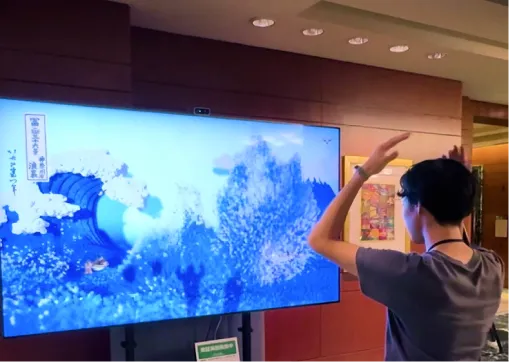
We created "Waves of Connection", an interactive installation at Expo 2025 Osaka that let visitors control Hokusai's Great Wave with their bodies.
The technical setup:
- WebGPU + Three.js for rendering
- ~1 million particles simulated in real-time
- Kinect depth camera for multi-person body tracking
- 98-inch 4K display for immersive scale
No VR headset. No controllers. Visitors just moved—and the wave responded.
The piece ran for 7 days, and over 10,000 visitors interacted with it. Children kept rejoining the queue. Adults who started unsure ended up waving their arms and laughing.
What This Demonstrates
Three.js skills transfer beyond the web. The same codebase patterns, the same particle systems, the same shader techniques—they work for physical installations, kiosks, digital signage, and immersive experiences.
8. What's Next? Trends to Watch
WebXR Expansion
WebXR (the standard for VR/AR in browsers) is maturing. Three.js supports it directly, including on WebGPURenderer since r185, and as headsets become more common, browser-based immersive experiences will grow.
AI-Generated Assets
Tools like NVIDIA GauGAN and Adobe Substance 3D Sampler are automating texture and material generation. Three.js projects will increasingly incorporate AI-generated assets, reducing production time.
Compute Shaders for ML
WebGPU's compute shaders enable running ML models directly on the GPU in the browser. Libraries like Transformers.js already leverage this. Expect Three.js projects to integrate local AI inference for real-time effects.
9. About Utsubo
Utsubo is an interactive creative studio specializing in:
- Web3D experiences: Brand websites, product configurators, immersive storytelling
- Interactive installations: Museums, retail, events, public spaces
- WebGPU development: High-performance applications requiring real-time 3D
We've worked with major brands and cultural institutions. Our projects have been recognized by Awwwards, FWA, and The Webby Awards.
10. Let's Talk
Building something ambitious with 3D on the web? We work with teams on interactive experiences, product configurators, and immersive brand projects.
If you're exploring a partnership, let's discuss your project:
- What you're building and the constraints you're working with
- Which technical approach makes sense for your goals
- Whether we're the right fit to help you execute
Summary: What This Means for Your Projects
Three.js in 2026 is defined by a steady release train, WebGPU in every major browser engine, and a library that now reaches from websites to data-heavy tools and physical installations.
For new projects: Start with WebGPURenderer. The automatic WebGL 2 fallback covers browsers without WebGPU.
For existing projects: Upgrade in steps of 10 releases or fewer and check each release's watch-outs in the table above. Move from WebGL to WebGPU when you hit performance limits, and measure the result: gains depend on the scene.
For hiring and teams: Three.js skills transfer across web, mobile, and physical installation work, and 12.2 million weekly npm downloads (September 2026) signal a large, well-supported ecosystem. If you're comparing studios, see our Three.js agencies guide.
Sources & References
- three.js release notes (GitHub)
- three.js Migration Guide
- three on npm: versions and publish dates
- npm download counts, September 15–21, 2026
- WebGPU browser support (caniuse)
- WebGPU implementation status (gpuweb)
- Collins Word of the Year 2025
- 2025 Vibe Coding Game Jam winners
FAQs
What is the latest version of three.js?
The latest release is r186, published to npm as three@0.186.0 on September 8, 2026. The previous release, r185, shipped on June 25, 2026, followed by the 0.185.1 patch on July 1. To see which version a project uses, run npm ls three or log THREE.REVISION in the browser console.
How often does three.js release a new version?
From r173 to r180 (January to September 2025), a release landed about once a month. The gaps have since widened: in 2026, a new release has landed every 8 to 11 weeks. Each release is tagged rNNN on GitHub and published to npm as 0.NNN.x, sometimes followed by patch versions.
What changed in r186?
r186 added SunLight, an addon light with cascaded shadow maps for both WebGLRenderer and WebGPURenderer; compileComputeAsync() for pre-compiling compute shaders; reworked energy conservation in PBR shading; and a Gaussian splatting addon. It removed PCFSoftShadowMap (the renderers now warn and use PCFShadowMap), deleted the rangeFog and viewportResolution TSL exports, dropped the minified builds and deprecated the CommonJS build.
Is WebGPU production-ready in 2026?
For most projects, yes. WebGPU is enabled by default in Chrome and Edge (version 113 and later on Windows, macOS and ChromeOS), Chrome on Android 12 and later, Safari 26 on macOS, iOS, iPadOS and visionOS, and Firefox on Windows and Apple Silicon Macs. Linux support is partial and Firefox on Android still needs a flag, but three.js's WebGPURenderer falls back to WebGL 2 automatically, so one codebase covers every user. Test on your target devices, including in-app browsers, before launch.
Should I upgrade to r186?
If you are on r183 or later, yes, after a short checklist: switch PCFSoftShadowMap to PCFShadowMap, remove rangeFog and viewportResolution imports (use screenSize), call super.dispose() in custom Object3D subclasses, and move require('three') and minified-build imports to the ES module. From older versions, upgrade in steps of 10 releases or fewer, as the three.js Migration Guide recommends, and compare lighting and shadows visually after each step.
How much does a Three.js project cost?
It depends on scope. Custom 3D work on the web starts at about $20,000: $20K–$50K for a custom site with one focused 3D or WebGL moment, $50K–$100K for a fully custom site with scroll-driven storytelling and integrated 3D, and $100K–$200K+ for full 3D worlds. Interactive installations run $40K–$80K for a custom multi-sensor piece and $100K–$200K for room-scale real-time 3D, with a $20K floor for a single-screen interactive. See our website cost guide and installation cost guide for the breakdowns.


 WebGL & Three.js Development