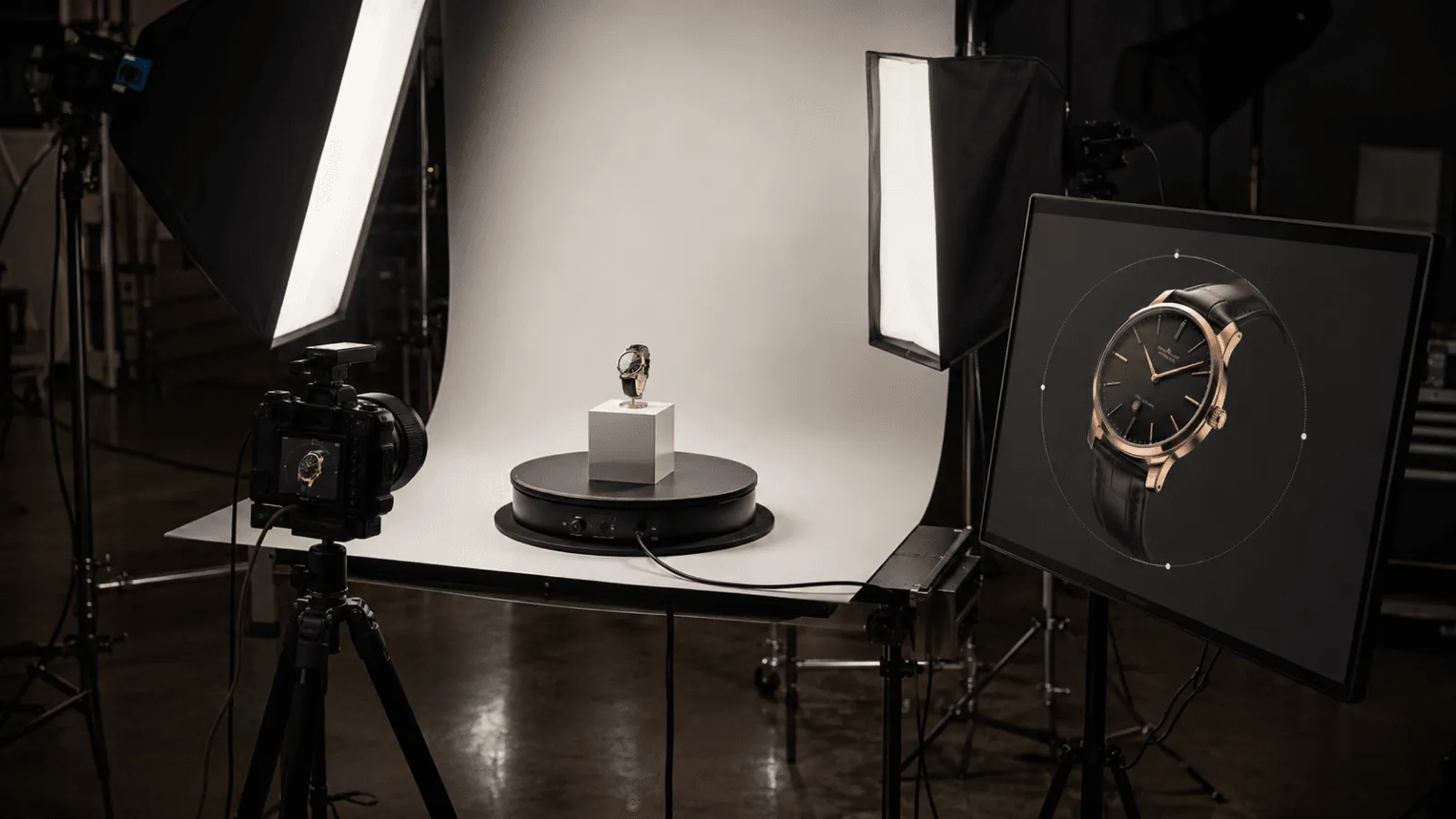
Open most 3D product sites and you can tell, instantly, that you're looking at 3D. The object is clean, it spins, it responds — and it reads as a model, not as the thing itself. That's not a failure. It's the honest cost of running in real time on a phone: to keep the experience smooth, the lighting is simplified, the materials are approximated, and the heaviest visual effects are switched off. Good real-time 3D looks like good real-time 3D, and for a lot of sites that is exactly right.
But for a brand whose product is the pitch — a watch, a fragrance, a sneaker, a flagship device — "you can tell it's 3D" is a compromise on the one thing you can't compromise: how the object looks. How light rolls across a brushed-steel case. How a material reads as leather, glass, or anodized aluminum instead of tinted plastic. How the thing moves. Reaching that fidelity in real time means simulating light the way a film renderer does — global illumination, accurate reflections, sometimes path tracing and physics — and that's the kind of work that brings an average device to its knees.
This guide is about closing that gap on the web. Not a tutorial on how to author it — a decision-maker's map of the routes to render-quality product 3D, what each one buys you, what it costs in performance and budget, and how to choose. The technical terms (PBR, baked lighting, pre-rendered sequences, Gaussian splatting) appear here as the levers you're choosing between, explained at the altitude of someone commissioning the work, not writing the shaders. If your goal is a narrative scroll experience rather than a single hero product, the immersive storytelling websites guide is the companion piece; this one stays focused on the product itself.
Who this is for: Brand, marketing, and product leaders commissioning a site where a product needs to look genuinely premium in 3D; creative and innovation leads scoping a high-fidelity web experience; and agencies that need a credible way to budget and brief one.
Key Takeaways
- Real-time web 3D is deliberately simplified to protect performance — that's why it reads as "3D." The fidelity question is separate: how accurately light, material, and motion are rendered on the object itself.
- Film-grade fidelity (accurate light, reflections, materials) is computationally expensive. Doing it live, every frame, on a mid-range phone is the core tension this whole field is solving.
- There are four practical routes to render-quality product 3D on the web: real-time PBR, pre-rendered/pre-baked sequences, baked-lighting hybrids, and Gaussian splatting — each trading interactivity against visual ceiling and load.
- Pre-rendered sequences let you ship literal film-render output and use camera, lighting, and scroll tricks to make it feel interactive — often the highest visual quality per byte for a hero moment.
- Splatting is a strong photoreal route, but viewers differ: PlayCanvas has one, and Utsubo runs its own renderer that mixes Three.js 3D objects with splats and can relight them for animation. Three.js remains the most mature, device-tested foundation for the real-time pieces.
- Budget follows the premium-website ladder: ~$20K–$50K for one render-quality 3D moment, $50K–$100K integrated, $100K–$200K+ for a full product world — plus a $15K–$80K custom-3D adder.
1. Fidelity vs. Performance: Why Web 3D Looks the Way It Does
It's worth being precise, because "make the 3D better" hides two completely different problems — and only one of them is really about achieving a photorealistic look.
1-1. Legibility is fine. Fidelity is the lever.
A real-time product viewer that's obviously 3D isn't a quality defect — it's a sensible trade. Every real-time scene has a frame budget: roughly 16 milliseconds to draw everything if you want 60fps. To stay inside it on the devices most visitors actually use, a build simplifies the expensive parts of rendering. The object still rotates, still responds — it just doesn't carry the full weight of how the real object catches light. That's normal, and for many sites it's the correct decision.
The problem is only a problem when the object itself is the brand — when product visualization is the whole reason the page exists. Then the simplifications you made for performance start eating the things that signal quality, and the gap between "obviously 3D" and genuinely photorealistic becomes the gap between a page that sells and one that undersells:
- How light reflects on it — the soft falloff on a curved metal surface, the way a sapphire crystal throws a highlight, the difference between matte and satin. Under-lit real-time rendering flattens all of this.
- The material read — whether a surface convincingly is leather, brushed aluminum, ceramic, or frosted glass, versus a plausible-but-plastic approximation.
- How it moves — weight, momentum, the way fabric settles or a hinge swings. Motion sells realism as much as a still frame does.
1-2. Why fidelity is expensive
The reason this is hard isn't artistry — it's physics. A film-quality frame simulates light bouncing through a scene: global illumination, accurate reflections and refractions, soft shadows, sometimes full path tracing, plus physics for cloth, liquid, or mechanical motion. A studio renderer takes seconds or minutes per frame to do that. A browser has to do it within that same 16-millisecond budget, on whatever device the visitor brought — a difference of several orders of magnitude.
So the entire discipline of photorealistic web 3D is a set of strategies for getting as close to that film look as possible without asking the device to simulate it live. The four routes below are exactly those strategies. Choosing well is the difference between product visualization that looks worth its price and a 3D model that looks like a demo.
For the adjacent question of why heavy 3D can hurt a site's search performance and how to defend against it, see the WebGL & Three.js SEO guide — this article stays on the visual-quality decision.
2. What "Render Quality" Actually Means
A few terms come up constantly when this work is scoped. Here's what each one buys you, in buyer's terms.
- PBR (physically-based rendering) — a way of describing materials by their real physical properties (how rough, how metallic, how reflective) so they respond correctly to light instead of being faked. It's the baseline for any product that needs to look like its real material. PBR is table stakes; the question is how good the lighting around it is.
- Lighting / HDRI — the environment a product is lit by. A photoreal light setup (often captured as a high-dynamic-range image of a real studio) is what makes a surface read as expensive. Lighting, more than polygon count, is what separates "render" from "model."
- Global illumination & reflections — light bouncing between surfaces, and accurate mirror/gloss reflections. The most expensive thing to do live, and the most missed when it's absent.
- Post-processing — the final-frame polish (depth of field, bloom, color grading, subtle grain) that makes a frame feel shot rather than computed.
You don't need to direct these. You need to know they're the dials, so that when a studio says "we'll bake the lighting and ship a pre-rendered hero with a real-time configurator below it," you understand the trade being proposed.
3. The Four Routes to Render-Quality Product 3D
Every render-quality web project is one of these four approaches, or a deliberate mix. They differ mainly in how much is computed live on the visitor's device versus prepared in advance.
3-1. Real-time PBR (Three.js / WebGPU)
The product is a live 3D model, lit with PBR materials and the best real-time lighting the frame budget allows, rendered every frame in the browser. Fully interactive — orbit, configure, zoom, recolor.
- Strengths: genuine interactivity, instant response, one asset serves every angle and every configuration.
- The ceiling: limited by what the device can simulate live. You can get strikingly close to render quality with good materials, baked detail, and a strong HDRI — but full live global illumination on mid-range mobile is still out of reach.
- Foundation:Three.js is the most mature and widely device-tested engine for this, which matters when your audience is on hundreds of different phones. WebGPU raises the ceiling further where it's supported, with a WebGL fallback for everything else.
- Best for: configurable products, anything the customer needs to manipulate (rotate, customize, open).
The clip below is real-time cloth physics on a t-shirt, simulated live in the browser — the fabric drapes and settles as a real material would, not as a pre-baked animation. This is the kind of motion fidelity that makes apparel read as cloth rather than a stiff mesh.
3-2. Pre-rendered / pre-baked sequences (co-lead route)
Instead of computing the image live, you render it in advance at full film quality — in a studio renderer with global illumination, path tracing, and physics — and play that output back on the web. The visitor isn't running the simulation; they're watching its result, with interaction layered on top.
This is often the highest visual quality per byte for a hero moment, because the render isn't constrained by a phone's frame budget at all. The craft is in making playback feel interactive rather than like a video:
- Camera and lighting moves choreographed to scroll, so the visitor drives the sequence.
- Multiple pre-rendered angles or states stitched so a click or drag jumps between them.
- Subtle real-time elements (particles, a reactive highlight, a configurable accent) composited over the baked frames.
The trade is flexibility: a pre-rendered sequence shows exactly what was rendered — change the product color and you re-render. For a flagship hero where the look has to be perfect, that's usually the right trade.
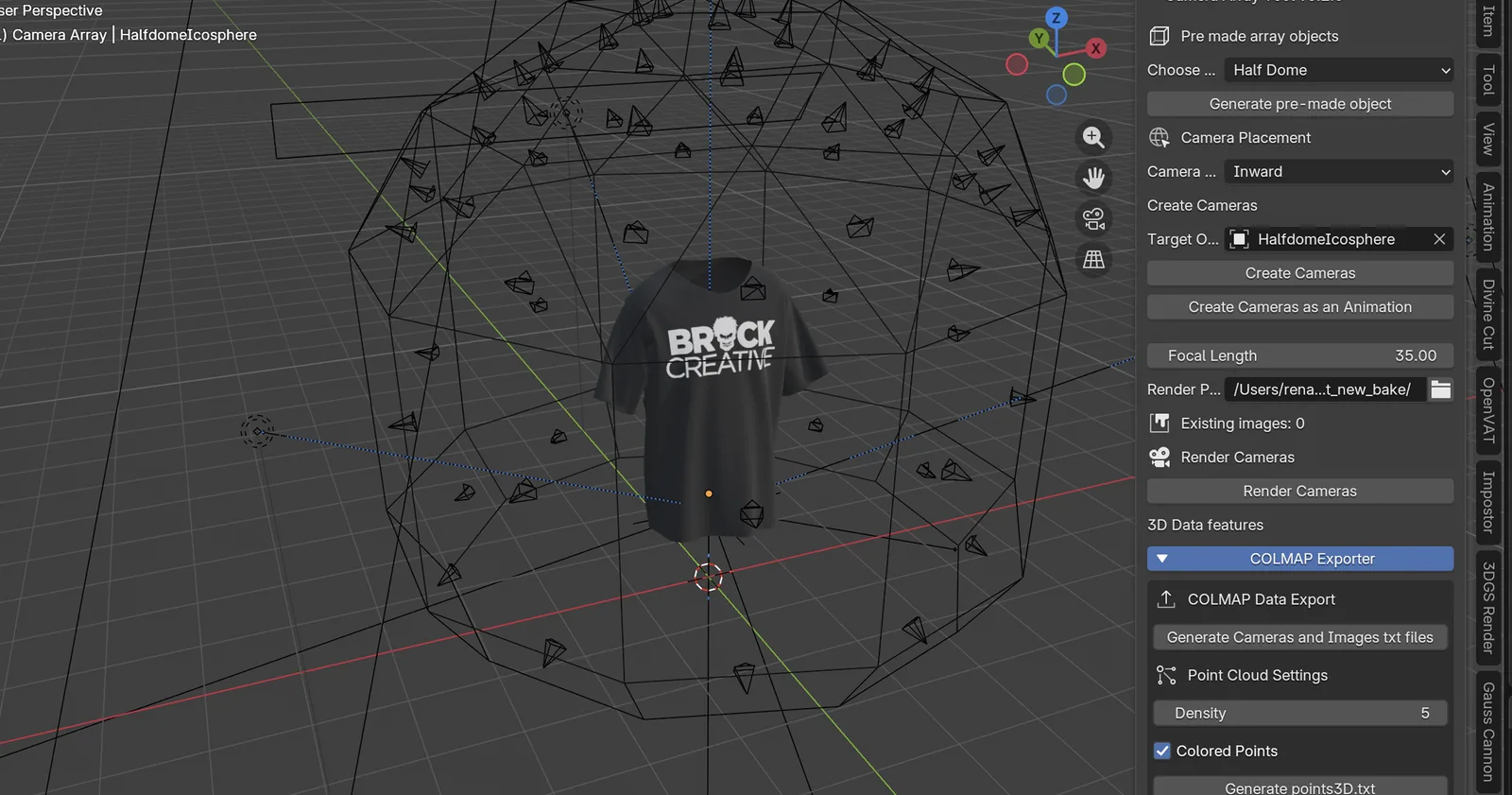
Below is our own Blender capture rig: a t-shirt inside a half-dome icosphere, recorded across a full 360° so we can generate whatever the web needs from one pass — a Gaussian capture, a 4D Gaussian sequence, or a baked transparent video — at the full quality Blender can render, then drop it onto a site.
3-3. Baked-lighting hybrids
A middle path: compute the expensive lighting once, ahead of time, and "bake" it into the model's textures (lightmaps, ambient occlusion, baked reflections). The browser then renders a model that already looks globally illuminated, but cheaply — leaving frame budget for real-time interaction on top.
- Strengths: much of the film-look richness, retained interactivity, mobile-friendly.
- The trade: baked lighting is static — it's correct for the lighting conditions you baked. Move a light freely and the illusion breaks. Perfect for a fixed, beautifully-lit product on a controlled set; less so for free relighting.
- Best for: premium product on a defined "stage," where you want it to look lit-by-a-photographer while staying interactive.
3-4. Gaussian splatting
Splatting captures a real object or scene as millions of soft points, reproducing real light and material with photographic accuracy — no manual material authoring. It's the strongest route when the goal is "make this real thing feel real online."
Viewers differ, and the choice matters for both performance and what's possible:
- PlayCanvas offers SuperSplat — an open-source splat editor and a companion viewer (
@playcanvas/supersplat-viewer) with a fast WebGPU renderer and LOD streaming. It's excellent at its job: clean up a capture, annotate it, add fly-throughs and post effects, and publish a polished splat scene. The trade-off is scope — it's a capture-cleanup-and-display pipeline, so the splat largely stays a fixed, beautifully-shown capture. Mixing arbitrary interactive 3D into the same scene, or relighting the splat, sits outside what it's built for. - At Utsubo we run our own splat renderer, built for better runtime performance, and — importantly — to mix Three.js 3D objects with splats in the same scene, to relight the splats, and to drive 4D-Gaussian animation and drag interaction. Splats also open up effects a fixed capture can't: particle-logic animation (the splat dissolving into or assembling from points) and morphing between two Gaussian states (one product transforming into another). That combination — photoreal captured material, interactive built-3D, controllable lighting, and animation — is hard to get from an off-the-shelf viewer.
What is 4D Gaussian splatting? A standard (3D) Gaussian splat is a frozen capture — one moment in time you can orbit around. 4D Gaussian splatting adds the fourth dimension, time: it's a splat that changes over time, so the captured scene can move — cloth settling, a lid opening, a liquid swirling — while keeping the photoreal quality of a splat (the technique was formalized in the CVPR 2024 paper 4D Gaussian Splatting for Real-Time Dynamic Scene Rendering). Think of 3D Gaussian as a photograph you can walk around, and 4D Gaussian as a video you can walk around. Running it in Three.js means that moving, photoreal capture plays back in the browser alongside ordinary 3D objects, with camera control and interaction on top.
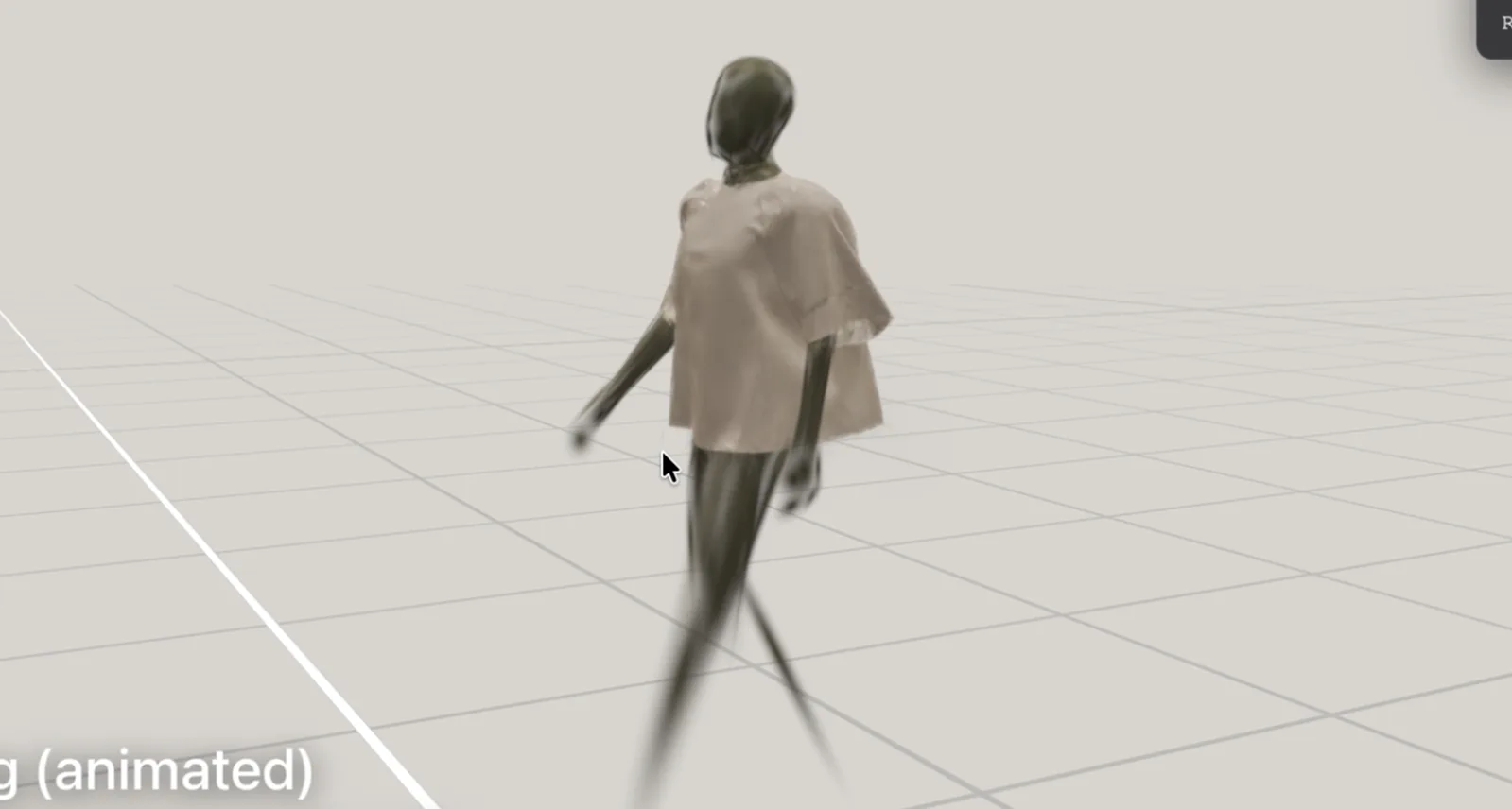
The frame below is an early test of 4D Gaussian in our custom Three.js player: the t-shirt is pre-rendered and pre-calculated, but the viewer can rotate the camera a full 360°, and the same data supports interaction — dragging the fabric, or driving an animation — rather than a fixed clip.
For choosing how to capture in the first place (splat vs photogrammetry vs others), see the capture-method commissioning guide; for splat formats and viewers in depth, the Gaussian Splatting guide. For a scroll-driven splat hero specifically, the Gaussian Splatting landing page guide covers the experience pattern.
4. Choosing a Route: Decision Framework
Most real projects combine routes — a pre-rendered hero, then a real-time configurator below it; a splat-captured environment with a built-3D product inside. Use this to decide where each belongs.
| Route | Interactivity | Visual ceiling | Load / mobile | Best-fit product |
|---|---|---|---|---|
| Real-time PBR | Full (orbit, configure) | High, capped by device | Moderate, needs budgeting | Configurable goods, anything the user manipulates |
| Pre-rendered sequence | Guided (scroll/click) | Film-grade — highest | Light per frame, can be heavy in total | Flagship hero where the look must be perfect |
| Baked-lighting hybrid | Full, within a fixed light setup | High | Mobile-friendly | Premium product on a controlled "stage" |
| Gaussian splatting | Orbit / explore | Photoreal (captured) | Engine-dependent; better with a tuned renderer | Real objects/spaces where capture beats modeling |
The honest heuristic: if the customer needs to change the product, you need a real-time route. If they need to be wowed by it, a pre-rendered or splat route usually wins. Many flagship pages do both — wow at the top, manipulate below.
Context:
- Product / category: [fill in]
- What the visitor most needs to do (admire it / configure it / explore it in a space): [fill in]
- Primary devices and audience: [fill in]
- How often the product look changes (colors, variants, seasons): [fill in]
- Rough budget range: [fill in]
Please help me:
- Recommend a primary route (real-time PBR / pre-rendered sequence / baked hybrid / splatting) and why
- Flag whether a hybrid (e.g. pre-rendered hero + real-time configurator) fits better
- List the trade-offs I'm accepting with that choice
5. Product Examples: Which Route Fits
- A watch. Material and light are everything — the case finish, the sapphire highlight, the dial texture. A pre-rendered hero (film-grade) for the showcase, optionally a baked-lighting real-time view to inspect angles. Splatting if you're capturing a real reference piece.
- Apparel / a t-shirt. Fabric drape and how cloth moves matter, and color variants change constantly. Real-time PBR wins for configurability (swap colors live); pre-simulated cloth motion baked in for realism.
- A sneaker. Often both: a pre-rendered or baked hero for the beauty shot, real-time PBR for the colorway configurator. The classic hybrid.
- A bottle (fragrance / spirits). Glass, liquid, and refraction are punishingly expensive live. Pre-rendered sequence is usually the right call for the hero — refraction looks film-grade and the device never has to compute it.
- A device / hardware. Exploded views, finishes, ports. Real-time PBR for exploration and configuration; baked lighting to keep it premium on mobile.
6. Performance & Mobile Reality
Render quality means nothing if it doesn't survive contact with a real phone on real Wi-Fi.
- Most traffic is mobile, and the heavy routes hit mobile hardest. Every approach needs a mobile plan: a lighter real-time tier, a capped-resolution sequence, or a graceful static fallback for the heaviest hero.
- Total weight matters as much as per-frame cost. A pre-rendered sequence is cheap to display but can be heavy to download; budget the bytes, stream progressively, and show a sharp poster frame immediately.
- First paint can't wait for the 3D. Defer the heavy bundle past initial render so the page is usable while the experience loads.
- It affects discoverability. A heavy canvas with no fast text content hurts Core Web Vitals — the WebGL & Three.js SEO guide covers deferring the bundle, worker-side compilation, and the static-image fallback. We won't repeat it here.
Performance is a line item in the brief, not a cleanup task at the end.
7. Common Pitfalls
- Chasing a film look in real time. Trying to force live global illumination onto mobile produces something that's neither fast nor beautiful. Pick the route that fits the device, or pre-render the part that has to be perfect.
- Compromising material quality to hit a frame rate. If the product is the brand, under-rendering its material defeats the point. Sometimes the answer is "pre-render this, don't model it live."
- No mobile plan. The most common reason a gorgeous build underperforms. Budget it from day one.
- Treating a pre-rendered sequence as a plain video. Without scroll/camera/interaction craft, it feels passive — losing the reason to build it on the web at all.
- Picking an engine for the demo, not the device range. What looks perfect on a workstation must be tested across the phones your audience actually carries; engine and renderer maturity matter here.
8. How to Commission It
Render-quality 3D sits on the premium-website cost ladder — it's a high-fidelity, integrated 3D build, not a separate category. Ranges depend on which route(s), how many products, interactivity, and language count. For broader context, see the Premium Website Cost Guide.
| Scope | Range | What you get |
|---|---|---|
| One render-quality 3D moment, within a website | $20K–$50K | A single hero product as a pre-rendered or real-time 3D centerpiece on an otherwise standard site build — one focused interaction, CMS, SEO. |
| Integrated product 3D | $50K–$100K | Multiple products or a hero + configurator, scroll/guided storytelling, integrated 3D, headless CMS, 90+ Lighthouse. |
| Full product world | $100K–$200K+ | Multiple zones/products, custom interactions, splat + built-3D hybrids, multi-market, dedicated performance engineering. At this scale it overlaps a navigable brand environment — see the digital twin / brand-world guide. |
On top of the base:
- Custom 3D / WebGL adder: +$15K–$80K depending on scene complexity and interactivity — usually the largest single variable.
- Multilingual: +30–50% per language.
What to ask a studio:
- Which route(s) do you recommend for this product, and why?
- How will it perform on a mid-range phone — show me, don't tell me.
- What's pre-rendered vs live, and what happens when we need to change the product?
- What's the fallback when the device can't run the full experience?
- Can you mix captured (splat) and built 3D, and relight it, if we need that?
9. About Utsubo
Utsubo is a creative-technology studio specializing in real-time 3D on the web and interactive installations. We build WebGL/WebGPU brand experiences with production-grade performance engineering — our own IVRESS brand experience, a cinematic WebGPU site with a WebGL fallback and TSL shaders across both backends, was named FWA Site of the Month and recognized by the CSS Design Awards.
For photoreal product work specifically, we run our own Gaussian-splat renderer — tuned for better runtime performance, able to mix Three.js 3D objects with splats in one scene, relight captured splats, and drive animated effects (particle logic, morphing between two Gaussian states) for art-directed moments. Combined with pre-rendered sequence work and real-time PBR, that lets us match the route to the product instead of forcing every brand through the same pipeline.
If you need a real-time 3D partner who treats both fidelity and performance as deliverables, that's the work we do.
10. Let's Talk
Building a product experience that has to look genuinely premium in 3D? We work with teams on real-time 3D, render-quality product visualization, and immersive brand projects.
If you're exploring a partnership, let's discuss your project:
- What you're building and the constraints you're working with
- Which technical approach makes sense for your goals
- Whether we're the right fit to help you execute
11. Checklist
- Decided what the visitor most needs to do (admire / configure / explore)
- Primary route chosen (real-time PBR / pre-rendered / baked hybrid / splatting)
- Hybrid considered (pre-rendered hero + real-time configurator)
- Material and lighting fidelity defined as a requirement, not an afterthought
- Mobile plan and fallback written into the brief
- Performance budget (per-frame and total bytes) set up front
- Languages and localized contact planned
- Studio shortlisted for render-quality web 3D (not just stock renders)
FAQs
Why does most 3D on websites look like 3D instead of the real product?
Because real-time 3D is deliberately simplified to stay fast on phones. To hold 60fps, builds approximate lighting and materials and switch off the most expensive effects. That's the right call for many sites — it only becomes a problem when the product itself is the brand and its material and light need to look genuinely premium.
What makes render-quality 3D so expensive to do live?
Film-quality images simulate light bouncing through a scene — global illumination, accurate reflections, sometimes path tracing and physics. A studio renderer takes seconds per frame to do that; a website has about 16 milliseconds, on whatever device the visitor brought. Closing that gap without melting the device is the whole challenge.
What are the options for getting a high-end look on the web?
Four routes: real-time PBR (live and interactive, capped by the device), pre-rendered sequences (film-quality output played back with interaction layered on), baked-lighting hybrids (expensive lighting computed once, then rendered cheaply), and Gaussian splatting (photoreal capture of real objects). Most flagship pages combine them.
Is Gaussian splatting better than building the product in 3D?
For capturing a real object or space with photographic realism, splatting is hard to beat. For something configurable or not-yet-existing, built 3D is better. The strongest results are often hybrids — a captured environment with interactive built-3D inside. Renderer choice matters: ours mixes Three.js objects with splats and can relight them, which off-the-shelf viewers generally can't.
What is 4D Gaussian splatting, and can it run in Three.js?
A standard 3D Gaussian splat is a frozen, photoreal capture you can orbit around — one moment in time. 4D Gaussian splatting adds time, so the captured scene can move (cloth settling, a lid opening, liquid swirling) while keeping splat-quality realism. Think 3D Gaussian as a photo you can walk around, 4D as a video you can walk around. Yes, it can run in Three.js — we play 4D Gaussian back in our own custom Three.js renderer, alongside ordinary 3D objects, with 360° camera control and drag interaction.
Can a pre-rendered sequence still feel interactive?
Yes — that's the craft. You drive a film-quality pre-rendered sequence with scroll, stitch angles so clicks jump between states, and composite real-time accents over the baked frames. The visitor feels in control even though the heavy rendering happened in advance. It's often the best visual quality per byte for a hero moment.
Why Three.js rather than another engine?
Three.js is the most mature and most widely device-tested real-time engine on the web, which matters when your audience is spread across hundreds of phone models. WebGPU raises the visual ceiling where it's supported, with a WebGL fallback elsewhere. Maturity and device coverage are features, not footnotes, for a brand that can't afford broken experiences.
How much does render-quality product 3D cost?
It sits on the premium-website ladder: roughly $20K–$50K for one render-quality 3D moment, $50K–$100K for integrated product 3D, and $100K–$200K+ for a full product world — plus a $15K–$80K custom-3D adder and +30–50% per extra language.
Will it work on phones?
Only if it's planned to. Every route needs a mobile tier — a lighter real-time version, a capped sequence, or a graceful fallback — plus deferred loading and a streaming pipeline. Budget mobile from the start; ignore it and you lose the majority of your audience.


 Technology-First Creative Studio