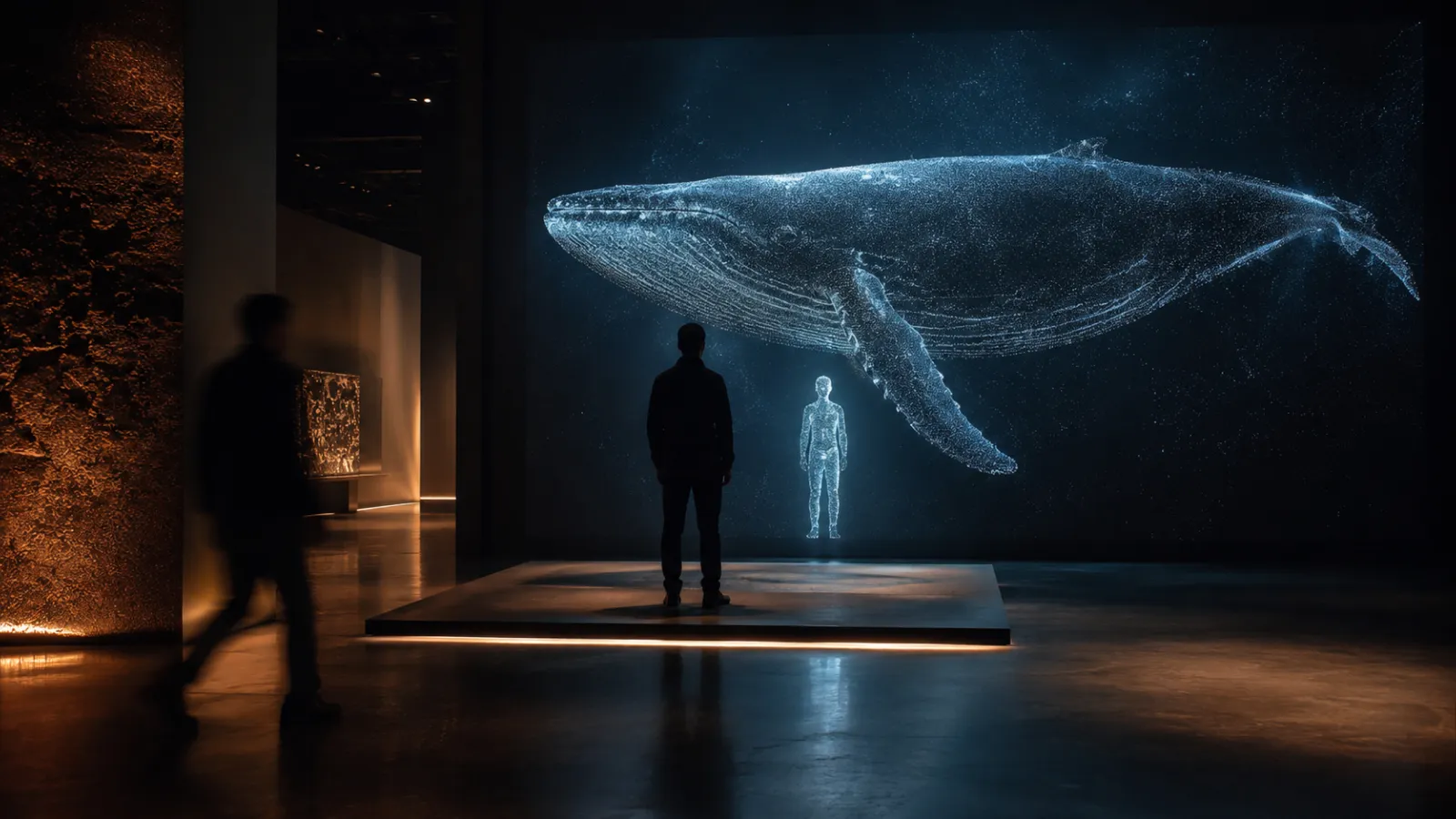
A visitor steps up to a booth, faces a camera for a few seconds, and sees a photorealistic 3D version of themselves standing next to a dinosaur, wearing an anime hero's outfit, or multiplied into an infinite clock of everyone who came before them. Then they post it. That loop — scan yourself, become the content, share it — is what turns a passive exhibit into a line out the door.
This guide is about the experience, not the render pipeline. It covers what a personalized-avatar installation actually does, the specific scenes that make visitors reach for their phones, what it costs, how many people you can put through it per hour, and the honest limits of the technology in 2026.
Who this is for: Museum and exhibition producers, brand-activation and experiential-marketing leads, event and campaign managers, and IP/entertainment brands evaluating a scan-to-3D or AI-transformation experience.
Key Takeaways
- A personalized-avatar installation captures a real visitor with a camera and generates a photorealistic 3D model of them — using Gaussian splatting — that can be placed in any scene, rigged to move, or transformed by AI, in under a minute (as fast as ~30 seconds) from photo to result.
- The value isn't the tech; it's the shareable moment. Every visitor becomes user-generated content, which turns the installation into an organic reach engine (Instagram, TikTok, X) instead of a cost center.
- Six proven scene patterns pay off: scale comparison (stand next to a whale), impossible placement (put yourself on the roof/in space), collective generative art (every scan recycled into one artwork), memory keepsake, IP insertion (wear the hero's outfit), and themed AI transformation.
- Realistic throughput is under 60 people/hour per booth including the animation; a single GPU can drive two booths in parallel (one animates while the other captures).
- Honest limits: the 2026 quality is excellent for full-body, scene-scale placement, but not yet close-up/portrait sharpness — this technology prioritizes speed over per-pixel fidelity, and it is improving fast.
- Budget sits on the interactive-installation ladder: roughly $20K–$40K for a single-booth activation, $40K–$80K for a custom multi-scene or AI-transformation build, and $100K+ for a flagship multi-booth or persistent installation.
1. What a Personalized-Avatar Installation Is
At its simplest: a camera, a screen, and a pipeline that turns a person into a 3D asset fast enough to feel instant.
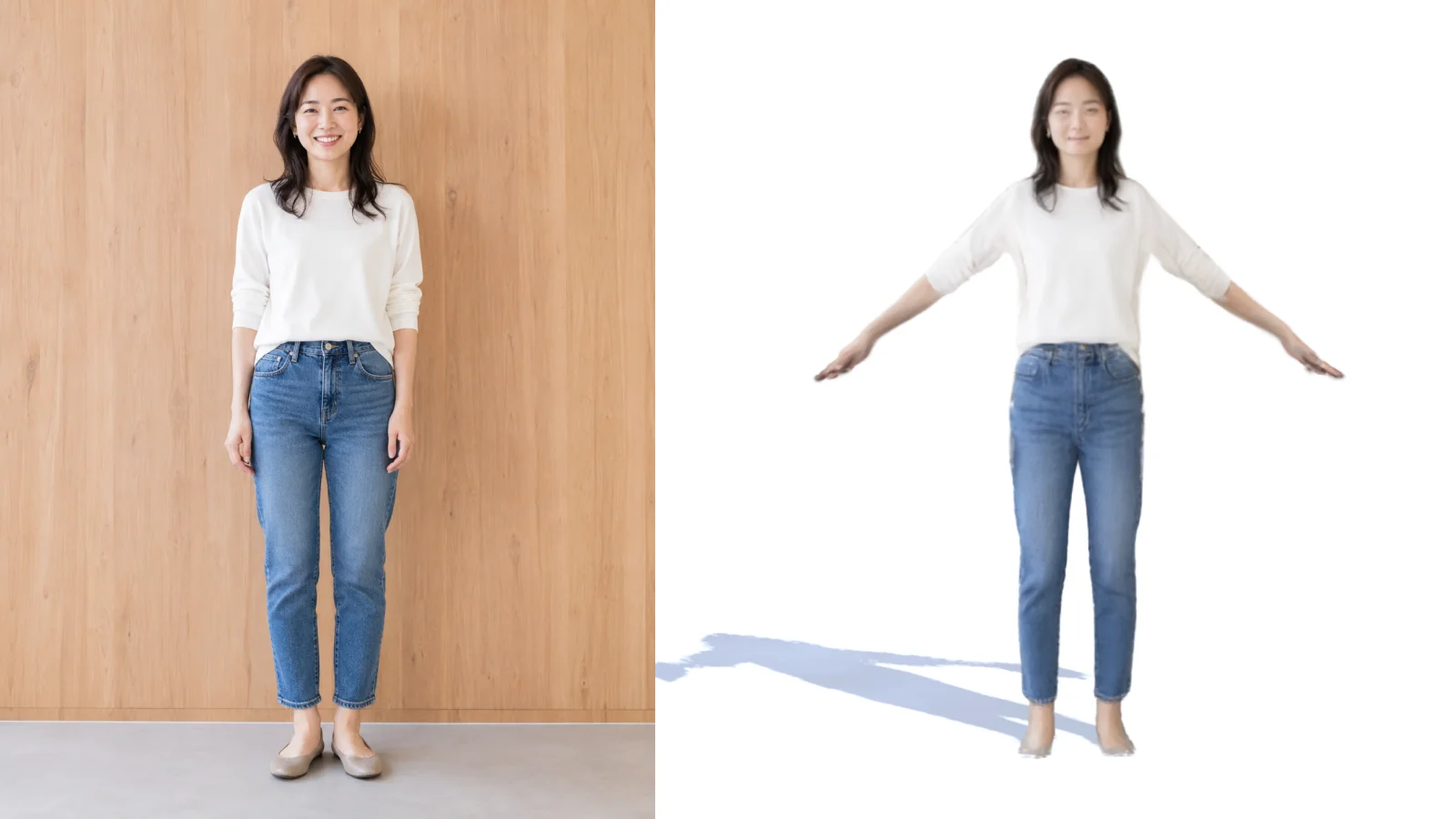
1-1. The capture → 3D → scene loop
- Capture. The visitor stands in front of a camera. A front photo is enough for most scenes; add a back capture only when the experience needs to show the person's back in 3D (the visitor turns away from the camera in the scene, or orbits fully).
- Generate. The system reconstructs them as a Gaussian splat — a photoreal 3D representation (see the Gaussian Splatting guide for how the format works). This is what makes the result look like them, not a cartoon avatar.
- Place or transform. The 3D model drops into a prepared scene, gets rigged so it can move, or passes through an AI step that re-skins it (an outfit, a character, a style).
- Show and share. The result plays on a big screen and exports as a clip or image the visitor takes with them — and posts.
1-2. Why Gaussian splatting, not a game avatar
Most "scan yourself" experiences produce a blocky mesh or a stylized cartoon. Gaussian splatting captures the actual light and texture of the person, so the output is photorealistic — recognizably them. That recognition is the entire emotional payload: people share a photoreal 3D version of themselves in a way they never share a generic avatar. For how splatting compares to photogrammetry, NeRF, and LiDAR as capture methods, see the capture-method guide.
2. The Speed Numbers (Why "Under a Minute" Matters)
For a queue-based public installation, generation time is the design constraint. The generation is fast enough that you can play a short holding animation the moment the visitor is captured — a loading sequence, a teaser, the scene building around where they'll appear — so the wait is absorbed into the experience and the whole thing feels seamless rather than "please wait." These are the real timings from our R&D setup, running on a cloud RTX-class GPU (RunPod RTX 5090):
| Step | Time | Notes |
|---|---|---|
| Gaussian model, front photo only | ~22 s | Fastest path; good for most scene placement |
| Gaussian model, front + back | ~37 s | More complete model, only when the scene shows the person's back |
| Rig (add bones so the model can move) | ~4 s | Done locally; skip it entirely if you only need a static pose |
So a full capture → 3D → rigged cycle can land under 30 seconds. If the scene only needs a static placement (standing next to the whale), you can show the model even faster and skip rigging.
Throughput: including the moment the visitor watches their animation play, realistic capacity is under 60 people per hour, per booth. One GPU can handle two booths at once — while booth A plays its animation, booth B is already generating the next visitor — so a single machine roughly doubles effective throughput.
3. The Scene Menu — What Makes People Share
This is the part that decides whether your installation is a gimmick or a queue magnet. The technology is the same; the scene is the product. Six patterns that consistently earn a phone-out reaction:
3-1. Scale comparison
Place the visitor's 3D self next to something they can't stand next to in real life — a life-size whale, a T. rex, a rocket, a blue-whale heart. Natural-history and science museums use physical scale to teach; this makes the visitor part of the comparison. "I'm as tall as this dinosaur's knee" is an instantly shareable, educational image.
3-2. Impossible placement
Put the visitor somewhere they physically can't be: on the roof of the building for a panoramic hero shot, in orbit, underwater, on a stage. The appeal is the impossibility — a photo that couldn't exist, starring them.
3-3. Collective generative art
Instead of one person at a time, every scanned visitor is recycled into a single evolving artwork — an infinite clock built from the day's visitors, a slowly rotating crowd, a swarm that grows as more people join. It rewards repeat looks ("find yourself"), and it makes the installation feel alive rather than transactional. You can mix in particle systems — including letter/typographic particles — so the crowd dissolves and reforms into words or shapes. This is the same real-time particle craft behind our Waves of Connection installation at Expo 2025 Osaka, where roughly a million particles respond to visitors' movement in real time.
3-4. Memory keepsake
The visitor leaves with a 3D version of themselves — a downloadable clip, an AR view, or a print. Lower on spectacle, high on retention and takeaway value. Works as an add-on to any of the other patterns.
3-5. IP insertion (the manga/anime play)
For an entertainment or publishing brand: the visitor is captured, then AI re-skins them into a character's outfit and drops them into a 3D scene alongside the cast — or into an animation where they fight a monster. A One Piece-style cosplay transformation, standing shoulder-to-shoulder with the heroes, is the kind of thing a fan posts immediately and tags the franchise. This is the strongest fit for licensed-IP activations, anime/game launches, and fan events.
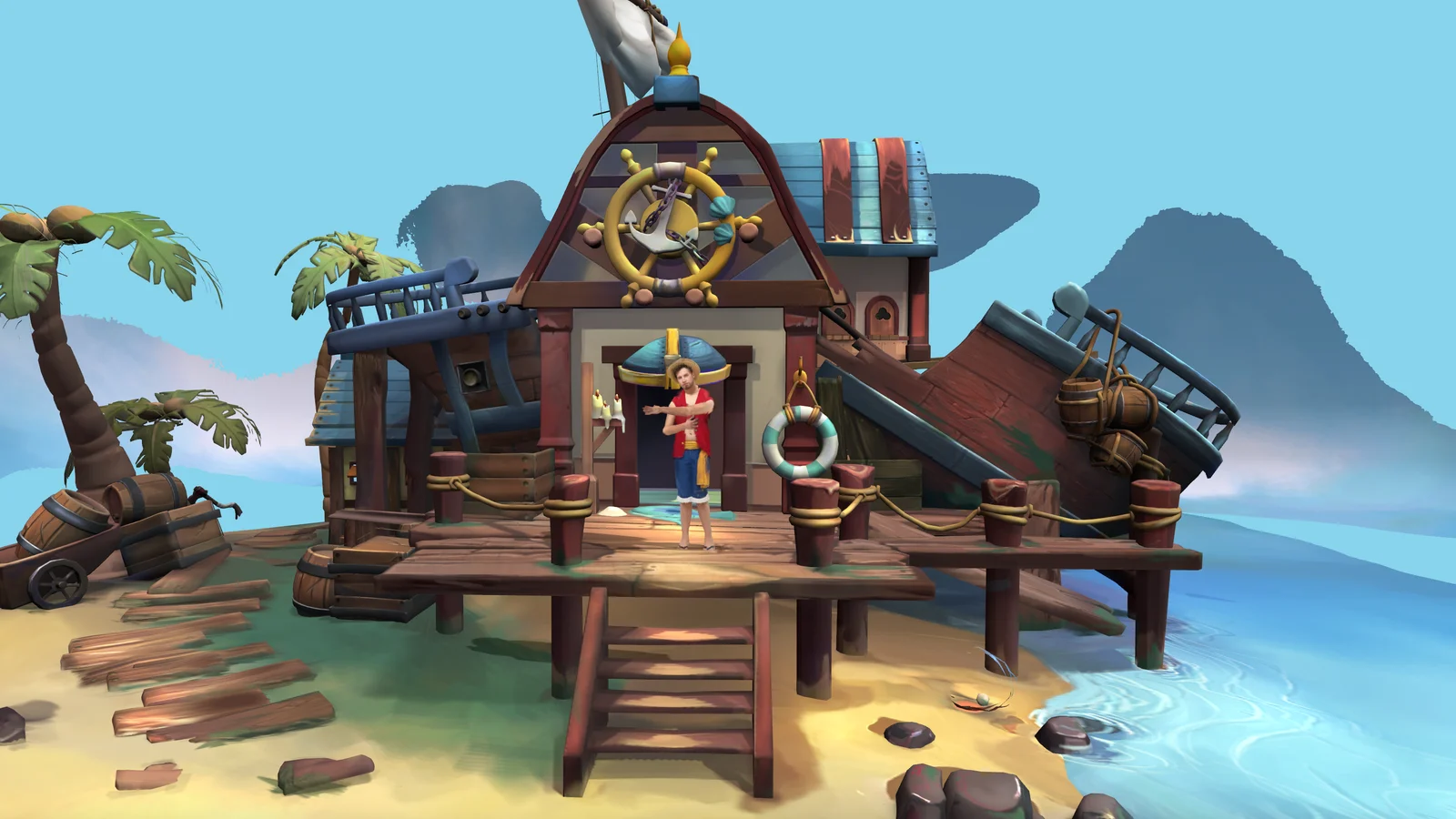
3-6. Themed AI transformation
The same AI step, without a specific IP: turn the visitor into a cyberpunk, historical, fantasy, or seasonal version of themselves. Fits film promotion, retail campaigns, and seasonal brand moments where the transformation is the message.
How the AI step relates to the scan: the Gaussian capture makes the photoreal 3D you; the AI transformation is a separate layer applied on top of (or instead of) the raw scan. Same core pipeline — the transformation is just another use case, not a different machine.
4. Why It Converts: The Content Loop
The reason a personalized-avatar installation earns its budget is that the visitor produces the marketing.
- Every scan is a share. A photoreal 3D version of yourself is inherently postable. Each visitor who posts reaches their own followers with your brand or exhibit in the frame — organic reach you didn't pay for.
- The output is native to social. A short 3D clip (orbit, animation, transformation) is exactly the format that performs on Instagram Reels, TikTok, and X.
- It compounds at events. A branded, taggable transformation at a launch or fan event turns attendees into a distributed campaign for the hours and days after.
This is the same experience-economy logic behind every high-share installation: people pay attention to, and share, experiences they're part of. For the strategic case, see The Experience Economy and Digital vs Physical Experience.
5. Honest Limits in 2026
Trust is built by naming the constraints before a client hits them.
- Not for close-up camera work yet. The 2026 quality is excellent for full-body, scene-scale placement — a person in a scene, viewed at a natural distance. It is not yet portrait-sharp for tight close-ups on the face. If your concept depends on a macro shot of someone's eyes, this isn't the tool today. This is a deliberate trade: the pipeline prioritizes speed over per-pixel fidelity so it can run in a public queue. The quality ceiling is rising fast.
- Capture conditions matter. Consistent lighting and a clean background at the booth materially improve results. This is a designed capture environment, not a phone in a hallway.
- Front-only vs front+back. Front-only is faster but leaves the back of the model incomplete — fine when the scene never shows the visitor's back, worth the extra ~15 seconds when it does.
- It's an experience, not a scanning service. The goal is a delightful shareable moment at speed, not an archival, dimensionally accurate 3D scan.
6. Privacy & Consent
You are capturing a person's face and body. Treat it as personal data from day one.
- Delete after the session. The default and recommended posture: scans are deleted after each session — the visitor gets their clip, and nothing personal is retained. This is the simplest way to stay clean under privacy law and to earn visitor trust at the booth.
- Explicit, up-front consent. A clear notice and opt-in before capture — what's captured, what it's used for, that it's deleted.
- Regional rules apply. In Japan, personal-data handling falls under 個人情報保護法; EU-facing events must respect GDPR; US activations may trigger state biometric/privacy rules (e.g. Illinois BIPA for face/body data). Bake the consent flow and retention policy into the brief, not the launch-day scramble.
7. Budget: What a Personalized-Avatar Installation Costs
This sits on the interactive-installation cost ladder. The variables are how many booths, whether you need the AI-transformation layer, how custom the scenes are, and how long it runs.
| Scope | Range (USD) | What you get |
|---|---|---|
| Single-booth activation | $20K–$40K | One capture booth, one or two prepared scenes, static or lightly animated placement, on-screen playback + share export, event-duration run. |
| Custom multi-scene / AI transformation | $40K–$80K | Bespoke scenes, rigging/animation, an AI re-skin layer (IP or themed), branded output, analytics, longer run or tour. |
| Flagship / multi-booth / persistent | $100K–$200K+ | Multiple booths, collective generative artwork, custom hardware, dedicated on-site reliability, ongoing content refresh. |
Cost drivers:
- AI-transformation layer (IP cosplay, themed re-skin) adds creative + licensing + pipeline work on top of the base capture booth.
- Compute. The generation runs on GPU (our R&D uses RunPod RTX 5090-class hardware at roughly ~$1/hour per GPU); one GPU serves two booths. Cloud GPU is the right call for short runs — a pop-up store, a two-day activation, a weekend event — where you pay only for the hours you use and haul nothing. For a long-running or permanent installation, we recommend buying a desktop tower with an equivalent GPU: past a few weeks of continuous operation, owned hardware is cheaper than metered cloud, and it removes the dependency on connectivity and a live cloud account on-site. Either way, compute is an operating/setup cost, not a build cost — modest relative to the build.
- Scenes and rigging. Each custom scene and any character animation is creative work; a single well-made scene goes further than many rushed ones.
- A web version (visitors scan at home, or the experience lives on a campaign site) rides the premium-website cost ladder instead — a real-time 3D web build, $20K–$100K+ depending on scope.
- Maintenance / event support: budget 10–15% of build per year for a persistent install; for a short activation, factor on-site technical support for the run.
Context:
- Venue / event type: [museum, brand activation, fan event, retail, launch]
- Primary goal: [social reach, dwell time, education, IP engagement, footfall]
- Do we need an AI transformation (IP outfit / themed re-skin)? [yes/no + which IP]
- Expected visitors and hours per day: [fill in]
- Rough budget range: [fill in]
Please help me:
- Pick which scene pattern (scale comparison / impossible placement / collective art / keepsake / IP insertion / themed transformation) fits the goal
- Estimate booths needed given the throughput (~<60 people/hour/booth)
- List the questions a studio needs answered to quote accurately, including the privacy/consent and retention policy
8. When NOT to Build One
- You need portrait-grade close-ups. If the concept lives or dies on macro facial detail, the 2026 quality isn't there yet — wait, or use a different technique.
- Low footfall. The ROI is the share loop; with few visitors, there's little content and little reach. A quiet corner doesn't justify the booth.
- No share incentive or hashtag plan. If nothing encourages posting (branded output, an easy export, a reason to tag), you've built a toy, not a reach engine.
- A photo op would do. If a simple branded backdrop and a phone gets you 80% of the outcome, don't over-build.
9. How to Get Started
- Pick the scene pattern first (Section 3) — the goal picks the scene, the scene picks the build.
- Decide if you need the AI layer. IP cosplay and themed transformation are a distinct creative + licensing workstream.
- Size the booths to your footfall using ~<60 people/hour/booth; one GPU drives two booths.
- Write the privacy/consent + delete-after-session policy into the brief, not the launch checklist.
- Plan the share loop — branded output, one-tap export, a reason to tag.
- Brief a studio that builds real-time 3D and Gaussian splatting, not a generic photo-booth vendor.
10. About Utsubo
Utsubo is an Osaka-based creative-technology studio specializing in real-time 3D, Gaussian splatting, and interactive installations. We've built our own Gaussian splat pipeline — including a fast human-capture R&D setup that generates a photoreal 3D person from a front photo in ~22 seconds and rigs it in seconds — plus a splat renderer that mixes captured splats with standard Three.js objects, relighting, dynamic shadows, and physics. That capture-to-scene pipeline is what makes a personalized-avatar installation feel instant instead of clunky.
We work across the full stack this kind of experience needs — on-site installation and real-time 3D on the web — and we've delivered at scale: our Waves of Connection installation at the World Expo 2025 in Osaka reinterpreted Hokusai's Great Wave as a body-controlled field of ~1,000,000 real-time particles, and we've built interactive work for JR, one of Japan's largest railway groups, among other cultural and brand clients.
11. Let's Talk
Planning an installation where visitors scan themselves into 3D — for a museum, a brand activation, or an IP/fan event? We work with teams on interactive experiences, Gaussian splatting, and real-time 3D.
If you're exploring a partnership, let's discuss your project:
- What you're building and the constraints you're working with
- Which technical approach makes sense for your goals
- Whether we're the right fit to help you execute
12. Checklist
- Scene pattern chosen (scale / impossible placement / collective art / keepsake / IP insertion / themed transformation)
- AI-transformation layer decided (and IP licensing cleared if applicable)
- Booth count sized to footfall (~<60/hour/booth; 1 GPU = 2 booths)
- Capture environment planned (lighting, background, front-only vs front+back)
- Privacy/consent flow + delete-after-session policy written into the brief
- Share loop designed (branded output, easy export, tag incentive)
- Close-up limitation checked against the creative concept
- Budget tier matched to booths, scenes, and run length
- Studio shortlisted for Gaussian splatting + real-time 3D (not a generic photo booth)
FAQs
How long does it take to scan a visitor into 3D?
A photoreal Gaussian model takes about 22 seconds from a front photo, or ~37 seconds with front and back. Adding bones so the model can move takes a few more seconds. The full capture-to-rigged cycle can land in about 30 seconds; a static placement can be shown even faster. Because it's this fast, a short holding animation plays while the model generates, so the wait feels seamless.
How many people can go through it per hour?
Realistically under 60 people per hour per booth, including the time the visitor watches their animation. A single GPU can run two booths in parallel — one generates while the other plays back — so one machine roughly doubles effective throughput.
Is the 3D model good enough for close-up shots?
Not yet, in 2026. The quality is excellent for full-body, scene-scale placement viewed at a natural distance, but it's not portrait-sharp for tight facial close-ups. The pipeline deliberately prioritizes speed over per-pixel detail so it can run in a live queue — and the quality ceiling is rising quickly.
What happens to the visitor's scan — is it stored?
The recommended default is to delete scans after each session: the visitor keeps their clip, and nothing personal is retained. Combined with clear up-front consent, this keeps the experience compliant (個人情報保護法 in Japan, GDPR in the EU, biometric-privacy rules like BIPA in parts of the US) and builds trust at the booth.
Can we transform visitors into a specific character or IP?
Yes. After the photoreal capture, an AI layer can re-skin the visitor into a character's outfit and place them in a 3D scene with the cast — or into an animation, such as fighting a monster. This is the strongest fit for anime/manga, game, and film activations; the IP must be licensed for the transformation.
What does a personalized-avatar installation cost?
It sits on the interactive-installation ladder: roughly $20K–$40K for a single-booth activation, $40K–$80K for a custom multi-scene or AI-transformation build, and $100K+ for a flagship or multi-booth persistent installation. Cloud GPU compute (~$1/hour per GPU, one GPU per two booths) is an operating cost on top.
Can this run as a website instead of a physical booth?
Yes — the same core pipeline can power a web experience where visitors scan at home or interact with a campaign site. That version follows the premium-website cost ladder (a real-time 3D web build) rather than the installation ladder. See the premium-website cost guide.


 Osaka Interactive Installation Studio